

Two tools, connected once. Describe an app in plain English, watch it get built, deployed, and hosted ~ no code, no hosting bills. That's not marketing copy ~ my app runs entirely on this stack.
Disclosure: the Higgsfield link in this guide is my creator referral link. Signing up through it supports my work, and it costs you nothing extra.
01 ~ The Stack
What you're setting up
Claude is where you describe what you want, in plain English, like briefing a very capable teammate. Higgsfield is the engine underneath: it generates the images and video, hosts your app, and runs the backend.
MCP is the cable between them. Once it's plugged in, you describe an app and watch it get built and deployed.
02 ~ Step 1
Create your Higgsfield account
Get started on HiggsfieldHere's the part people miss. Signing up isn't the setup. The connection to Claude is, and that's step 2 below. Until it's in place you're describing an app to something that can't build one. Check Higgsfield's pricing page for what generations cost on your plan ~ it changes.
03 ~ Step 2 · 2 minutes
Connect Higgsfield to Claude
- Open Claude (claude.ai or the desktop app)
- Go to Settings → Connectors
- Find Higgsfield in the directory and add it
- Sign in with your Higgsfield account and approve the connection
You'll know it worked when Claude can list Higgsfield tools. Ask it "what Higgsfield tools do you have?" and it should show image generation, video generation, and the website builder. If Higgsfield doesn't appear in your connector list, add it as a custom connector with the MCP url from their docs.
04 ~ Step 3
Build something
Open a chat with Claude and describe your app: what it does in one sentence, the core flow as numbered steps, where generation happens (tell it explicitly to use Higgsfield), and the vibe in a couple of lines.
Or skip the blank page entirely. This is the exact template I shared on the live ~ copy it, fill the blanks, paste it into Claude:
Build me a web app called "[YOUR APP NAME]".

What it does (one sentence):
[e.g. "Turns your daily gratitude note into a piece of generated art"]

Core flow:
1. User sees one question: "[YOUR ONE QUESTION]" with a single text input
2. When they submit, generate ONE image using Higgsfield image generation:
   [describe what the image should represent, e.g. "a warm, atmospheric
   illustration of what they wrote, as an imaginary place"]
3. Show the image with a fun loading state while it generates
4. Save every generated image to a gallery page with the text and date

Rules:
- Use Higgsfield's image generation for all images (this matters for
  contest eligibility)
- Images should have no text or words in them
- Mobile-first, dark background, one accent color, big friendly type

When it works in preview, deploy it through Higgsfield and give me
the live URL.
Then iterate in plain English: "make the input bigger," "add a share button," "change the loading text to something funnier." Your first version will be 70% right. The last 30% is just telling it what to change ~ that's the actual skill. When it's ready, ask Claude to deploy it through Higgsfield, and you get a live URL on the spot.
One rule worth knowing: if you enter one of Higgsfield's contests, your app has to use their own generation. Apps that route it through other APIs are disqualified.
05 ~ Steal These
Starter ideas (make one yours)
Three shapes that fit the template above exactly ~ one question in, one generated image out, a gallery that fills up.
Compliment Cannon · type a friend's name and one thing about them → generates a ridiculous heroic portrait scene to send them
Craving Translator · type what you're craving → generates the dish as cinematic food art (don't build this hungry)
Win Wall · type one small win from today → it becomes a trophy-room scene, and the gallery fills up over the week
Notice none of these are focus apps. Build your brain's thing, not mine.
06 ~ Step 4
Try what this stack produces
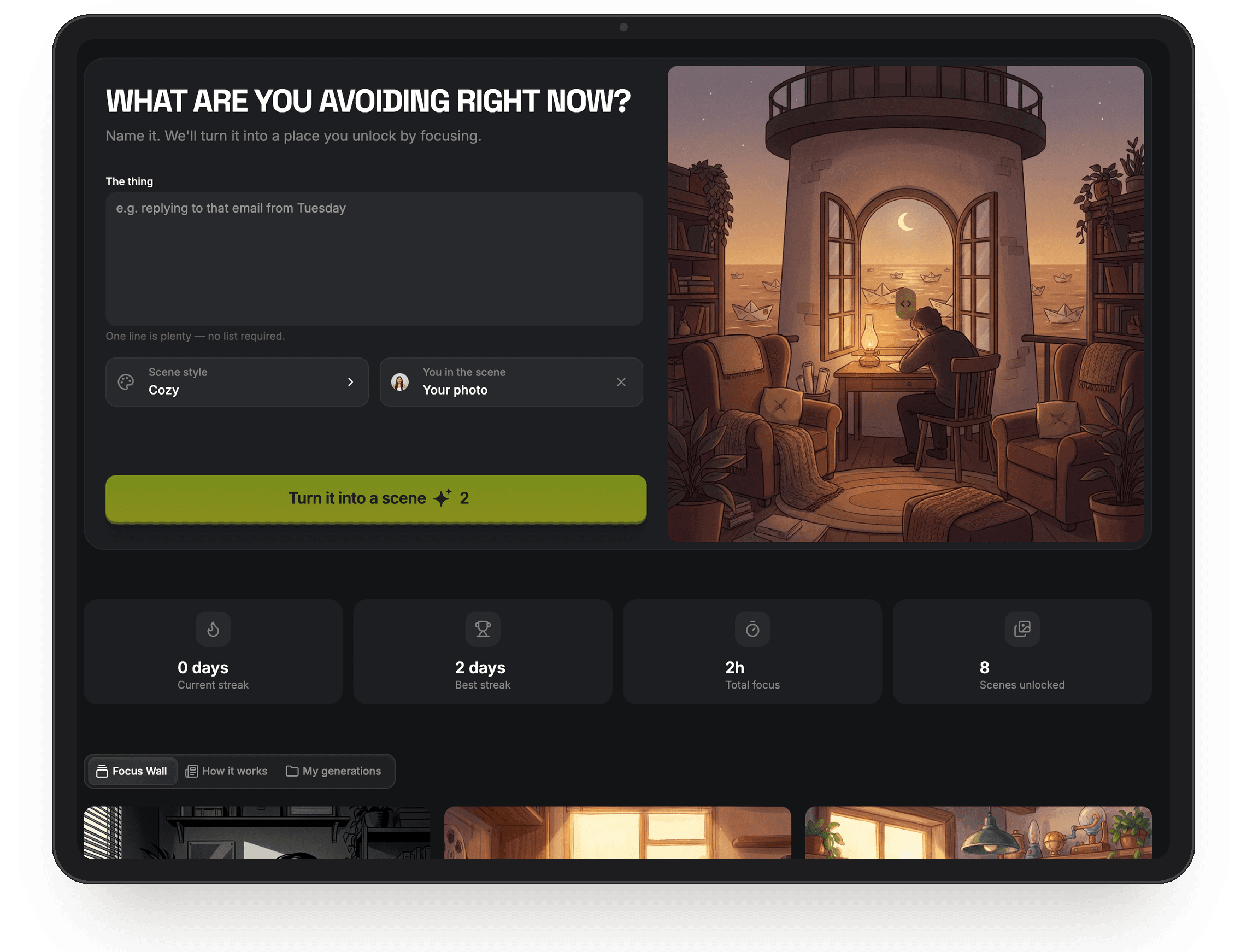
Here's mine: Dopamine Desk. A focus app for people whose to-do lists are where tasks go to die. You type the thing you're avoiding, it becomes a piece of generated art blurred behind a focus timer, and the image only unlocks if you finish the session. Every completed session joins your Focus Wall: your finished tasks as a gallery, not a checklist.
Dopamine Desk
Focus, but make it art
In the real app, run your first session like this:
- Open the app and sign in with your Higgsfield account (your credits work there directly)
- Type something you've genuinely been putting off ~ honesty is the fun of it
- Pick a style: Cozy, Neon Night, Storybook, or Noir
- Start the timer and go do the thing
- Come back to your reveal
Full transparency
Dopamine Desk was my entry in Higgsfield's $100K contest, which judged apps on how much people actually used them. That's closed now, so nothing you do here counts toward anything of mine ~ but I'd rather say that plainly than leave an old pitch sitting here.
07 ~ The Money
Why I built it in the first place
A deadline. Higgsfield ran a $100,000 contest for apps built on their platform ~ $25K first place, thirteen prizes in total, free to enter, submissions closed July 22. That's what turned "I should try this" into a weekend of actually building.
You've missed that one, and it doesn't matter. The setup above is the same with or without a prize pool, and Higgsfield runs these regularly ~ the Apps page is where new ones show up. Give yourself an artificial deadline if there isn't a real one. Mine is the only reason Dopamine Desk exists.
See what's running nowThat's the same link as step 1 ~ it drops you straight onto the Apps page, so your signup and your first build start from one place. If you build something, post it and tag me. I feature the best builds from this community, and I mean that.
08 ~ FAQ
Quick answers
- Do I need to know how to code?
- No. Describing clearly and iterating patiently matters more than any syntax.
- What do generations cost?
- A couple of credits per image in my app. Check Higgsfield's pricing for what your plan includes ~ it changes.
- Can I make money from my app?
- Contests are the fastest route when one is running. Beyond that, you own a live product with a URL, and what you do with distribution is the real game. That's what I teach.
- Something broke, who do I ask?
- Higgsfield's docs for platform issues, or bring it to the community and we'll debug it together.
Built something with this guide? Show me. And if you want to go deeper than one blog post, that's exactly what we do inside Claude Maxxing every week.

Love,
Abie